Best USDT TRC20 Wallets in 2026: Top Apps & How to Send Without TRX
Last Updated: November 2026
Here is the thing nobody tells you before your first TRC20 transfer: the coin in your wallet and the coin the network charges you in are two different assets. Your USDT sits in the balance. TRON charges every transfer in TRX. If a wallet holds USDT and no TRX, the money is right there, you can see it, and it will not move.
If your goal is receiving, sending regularly, or cashing out to local currency without buying TRX, a platform account like CoinCola avoids the TRX hurdle altogether. If you want long-term self-custody and hold your own keys, Trust Wallet, TronLink, or OKX Wallet are the strongest starting points depending on how you use TRON.
Quick Comparison: Best USDT TRC20 Wallets (2026)
| Wallet / Platform | Type | Platforms | TRX Needed to Send? | Transfer / Withdrawal Fee Notes | Best For |
| CoinCola | Platform Account | Web, iOS, Android | No | 2 USDT external withdrawal (adjustable); free internal transfers up to 1,500 USDT/month | Receiving, sending & P2P cash-out without TRX |
| Trust Wallet | Self-Custody | iOS, Android, Browser Ext. | Yes (TRX / Energy) | Paid in TRX (varies with network load / energy) | Beginners wanting simple self-custody |
| TronLink | Self-Custody | iOS, Android, Chrome Ext. | Yes (TRX / Energy staking) | Paid in TRX; lower via staked Energy | TRON power users & dApp/Energy management |
| OKX Wallet | Self-Custody | Web, iOS, Android, Ext. | Yes (TRX / Energy) | Paid in TRX (varies with network load) | Multi-chain traders across 80+ networks |
| Bybit Web3 Wallet | Self-Custody | Web, iOS, Android | Yes (TRX / Energy) | Paid in TRX (varies with network load) | Bybit traders moving between exchange & Web3 |
| imToken | Self-Custody | iOS, Android | Yes (TRX / Energy) | Paid in TRX (varies with network load) | Security-focused users in Asia |
| Klever Wallet | Self-Custody | iOS, Android, Desktop | Yes (TRX / Energy staking) | Paid in TRX; staking / KLV rewards supported | TRON staking & KLV enthusiasts |
If you plan to receive USDT regularly on the TRON network, compare the best USDT TRC20 wallets first so you know whether you prefer a self-custody setup or a platform account that does not require holding TRX for gas.
Top 7 USDT TRC20 Wallets Reviewed
1. CoinCola Wallet (Best for No-TRX Transfers & P2P Cash-Out)
This is the short path for most everyday users, and it is the one most people actually need. Six steps, none of which involve buying TRX.
- Download or sign up on Web. CoinCola is available on Web, iOS, and Android. Desktop users can register directly in their browser, while mobile users can download the app. Signing up takes an email address or a phone number, and there is no minimum balance to open an account.
- Verify your identity. You can register and receive before this, but withdrawals require a completed KYC check. Better to know now than to find out with money already sitting in the account.
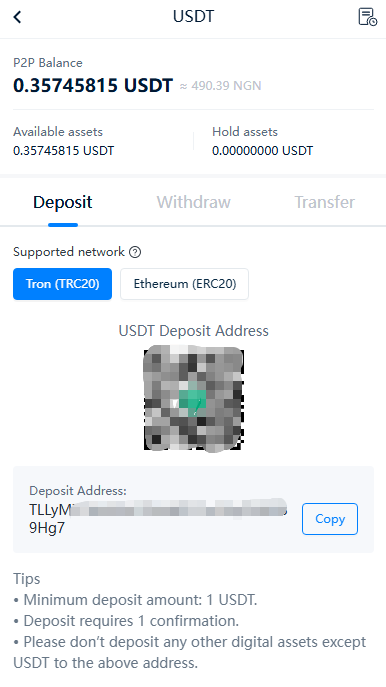
- Find your TRC20 deposit address. Open Wallet, choose USDT, tap Deposit, and select the TRON (TRC20) network. Every CoinCola account has its own address on each supported network, and it stays yours — you can save it and use it again.
- Receive. Send the address to whoever is paying you. The sender has to pick TRON (TRC20) on their side too, and CoinCola states this plainly on the deposit screen: this address only accepts USDT, and other assets sent to it are not recoverable. Deposits need one confirmation and the minimum deposit is 1 USDT. If the person paying you also has a CoinCola account, use an internal transfer instead of an on-chain one — it settles in real time and costs nothing within a monthly allowance of 1,500 USDT, with 2 USDT charged on each transfer above that.
- Send it out. Paste the destination address, choose TRON (TRC20), and confirm. The withdrawal fee is 2 USDT, deducted from your USDT balance, and there is no separate TRX balance to top up. Minimum withdrawal is 12 USDT. CoinCola notes the fee can be adjusted with network congestion, so the number to trust is the one on the confirmation screen, not the one in this article.
- Cash out to local currency. Buy an existing P2P offer, or post your own and wait for a taker. Escrow holds the crypto until both sides confirm, so neither party can walk off mid-trade. Naira, cedi, and shilling payouts go to a bank account or a mobile wallet (for example, the NGN withdrawal fee is 200 NGN), alongside support for additional regional P2P payment methods. If your funds start out as unused gift cards rather than a direct transfer, see our guide on how to convert gift cards to USDT before deciding where to hold or withdraw them.
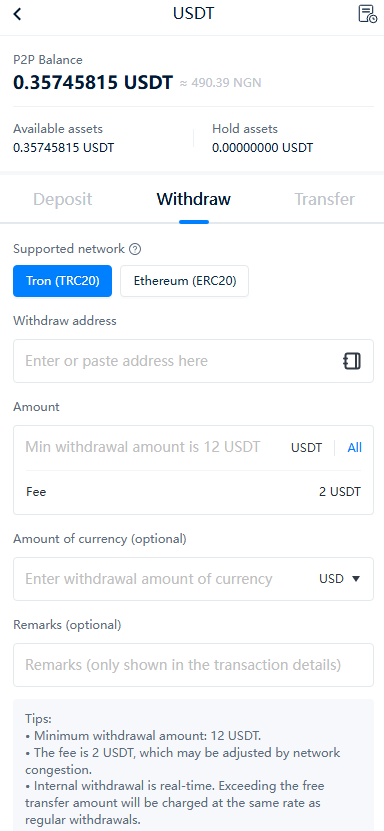
What you are giving up. CoinCola holds the USDT, not you. That means no seed phrase to lose and no 3am panic over a backup you never wrote down — and it also means you are trusting a company. If the account were frozen, there would be no keys to fall back on. Withdrawals need KYC, so the account is not anonymous. And 2 USDT is a fixed charge per withdrawal rather than the cheapest way to move USDT on TRON: if you already hold TRX and you are sending a small amount, a self-custody transfer will usually cost less, and CoinCola does note that its fee can be adjusted with network congestion. What the 2 USDT buys is a number you see before you confirm and a step you never have to think about.
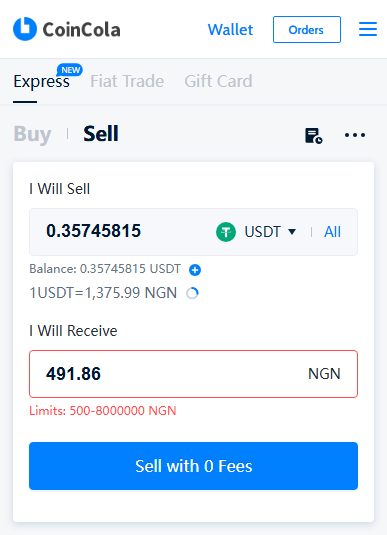
Where this beats a self-custody wallet outright. If the person paying you also holds a CoinCola account, the money never touches the TRON network. You send it to their account, and it arrives in real time: no TRX to buy, no energy to estimate, and no fee at all within a monthly allowance of 1,500 USDT. No self-custody wallet can do that, because every TRC20 transfer it makes is an on-chain transaction, and every on-chain transaction is paid for in TRX. For anyone paid the same way every month — a family remittance, a client settling in USDT, or freelancers and remote workers looking to get paid in USDT — that single difference is most of the argument.
2. Trust Wallet (Best Overall for Beginners)
Trust Wallet is one of the most widely installed non-custodial mobile wallets, and it supports TRON natively, so USDT TRC20 works out of the box with no manual token setup. It was acquired by Binance in 2018, which is the institutional backing people usually mean when they call it safe. Native TRON support plus 100+ other blockchains, built-in DEX swap, free to download with no account or KYC, seed phrase stays on your device. Best for first-time crypto users and P2P traders who want the shortest path from download to first transfer.
3. TronLink (Best for TRON Power Users)
If your activity is concentrated in the TRON ecosystem — staking TRX, using TRON dApps, sending TRC20 tokens regularly — TronLink is purpose-built for it. It is the wallet endorsed by the TRON Foundation and it exposes TRON-specific controls that general-purpose wallets hide. Direct TRONScan integration, TRX staking built in so you can earn bandwidth and energy, browser extension and mobile app, TRC10 and TRC20 both supported. Best for active TRON users, developers, and anyone sending USDT TRC20 at high volume.
4. OKX Wallet (Best for Multi-Chain Traders)
OKX Wallet has become one of the more capable Web3 wallets over 2025–2026, with native TRON support inside an 80+ chain interface. If your USDT moves between TRC20, ERC20, and BEP20 depending on who you are paying, this is the one app that covers all three without juggling seed phrases. Cross-chain bridge, MPC key management, hardware wallet connection including Ledger. Best for intermediate to advanced users who want one wallet across several chains.
5. Bybit Web3 Wallet (Best for Traders Who Also Use an Exchange)
Built for people who already trade on Bybit. Its advantage is the connection to the exchange: if you already hold USDT there, moving between your trading balance and a self-custody wallet happens inside one app rather than across two. Connected to the Bybit exchange account, consumer-grade interface, TRC20 support alongside a multi-chain roster, self-custody with keys held on your device. Best for existing Bybit users who move frequently between exchange custody and self-custody.
6. imToken (Best for Security-Conscious Users in Asia)
One of the older non-custodial wallets, launched in 2016. It is the least flashy option on this list and that is the point. Live since 2016 with no major wallet-level breach publicly reported, audited smart contracts, TRC20, ERC20, BEP20, and 30+ other chains, multi-language interface. Best for users who care more about not losing funds than about having every feature.
7. Klever Wallet (For TRON Staking Enthusiasts)
Klever keeps a loyal following among TRON stakers who want to earn KLV rewards while holding USDT. It is not our top pick for pure TRC20 usage, because its feature set is narrower than the wallets above, but if TRON ecosystem staking is part of your strategy it still does the job. Native TRC20 support, TRON staking and KLV rewards built in, mobile and desktop. Best for stakers who want one app for both TRON rewards and USDT storage.
Why We No Longer Recommend Atomic Wallet
Atomic Wallet appeared in a lot of best TRC20 wallet lists before 2024, including an earlier version of this article. We removed it, and here is the reason in full.
In June 2023, Atomic Wallet users lost more than $100 million in a single attack. Early estimates put the loss at $35 million; Elliptic revised the figure upward as more victim wallets came forward. Elliptic, the blockchain analytics firm that traced the funds, reported that over 5,000 wallets were compromised, that at least ten addresses lost more than $1 million each, and that the average loss was about $2,800. Elliptic attributed the theft to North Korea’s Lazarus Group. Atomic acknowledged the compromised wallets on June 3 and said fewer than 1% of users were affected, but as of Elliptic’s report there had still been no explanation of the root cause. Investigators and exchanges froze over $1 million of the stolen assets; the attacker responded by routing funds through Garantex, a Russia-based exchange sanctioned by the US Treasury.
Atomic Wallet still functions. That is not the question. The question is whether you should trust a wallet that never explained how its users lost $100 million, and our answer is no. If you currently hold USDT in Atomic Wallet, move it to one of the six wallets above and generate a fresh seed phrase rather than importing the old one.
Why Your TRC20 Transfer Fails Without TRX (And How to Fix It)
TRON bills for two resources, bandwidth and energy, and it takes payment in TRX. Moving TRX itself uses bandwidth. Sending a TRC20 token like USDT is a smart-contract call, which consumes energy, and more of it than a plain transfer. However the wallet handles that cost, it comes out of a TRX balance in the end: either TRX is staked to produce energy, or TRX is burned from what you hold.
None of this is a flaw in TRON. It is how the network pays to run. It becomes a problem because of who ends up holding USDT. Most people get it from a friend, an employer, or a client, and have never bought a coin themselves. They open a wallet, see 200 USDT, tap Send, and get told the balance is not enough.
Two things make that moment worse than it sounds. The missing asset is not a smaller version of the one you have — you cannot pay a TRX fee with USDT, however much USDT is sitting there. And the fix runs the wrong way round: to move money you already own, you first have to open an account somewhere that sells TRX, buy some, and withdraw it to the same wallet address.
Some wallets soften this. TronLink and Klever both let you stake TRX and generate energy from it, which cuts the cost of later transfers. You still need TRX in the first place, and the first transfer is always the expensive one.
If you are holding your own keys because that is the point for you, this cost is the price of the arrangement, and it is worth paying. If you are moving money in and out, or turning USDT into naira, cedis, or shillings, using a platform account avoids having to buy a second coin just to move your balance.
Platform Account vs. Self-Custody: Which Should You Choose?
Put them side by side and the difference stops being about wallets. It is about who carries which risk.
| Dimension | Self-Custody Wallet (Trust, TronLink, OKX, Bybit, imToken, Klever) | Platform Account (CoinCola) |
| Who holds the keys | You | CoinCola |
| Do you need TRX to send? | Yes, every time | No |
| Cost to receive | Free | Free |
| Cost to send | Paid in TRX, varies with network load | 2 USDT to an external address, adjustable with congestion; free to another CoinCola user up to 1,500 USDT a month |
| Minimum withdrawal | Set by the network | 12 USDT |
| Identity check | None to hold | Required before withdrawal |
| If you lose your phone | Funds gone unless you backed up the seed phrase | Access through your account |
| Best for | Long-term storage, holding without KYC | Receiving, sending, converting to local currency |
| Main risk | Your own mistakes | Counterparty risk |
Read the third row together with the last two. They are the whole decision. A self-custody wallet is safer against a company failing and worse against a person losing a piece of paper. A platform account is exactly the reverse.
In one line each:
- Holding a small balance you will not touch for months, and you do not want to hand your ID to anyone: self-custody wallet.
- Receiving, sending regularly, or turning USDT into local currency: platform account.
When Self-Custody Is the Right Answer
There are three cases where the extra friction is worth it, and none of them is the common case.
- You are parking a balance you will not touch for months or years. A hardware wallet, or a software wallet you have backed up properly, is the right home for it.
- You do not want to send identity documents to a platform, and you accept that nobody can help you if you make a mistake.
- You do not want a third party to be able to freeze your balance, for any reason, ever.
The honest counterweight: in all three cases you become your own security team. There is no password reset. A seed phrase lost in a fire is unrecoverable, and a transfer sent to the wrong address cannot be reversed by anyone. That is the trade, and it is a real one — it is just not the trade most people who ask which TRC20 wallet to use are actually making.
3 Common USDT TRC20 Mistakes (and How to Avoid Them)
- You sent USDT to an address on the wrong network. TRC20 USDT arriving at an ERC20 address does not bounce. The tokens land at an address that has no instruction to forward them, and the sending wallet will still report the transfer as successful. Contact the receiving platform immediately — some can recover the funds manually, some cannot, and the ones that can usually charge for it. This is why the first transfer to a new address should be an amount you can afford to lose.
- It says sent, but the balance never arrived. Get the transaction hash and open it on TRONScan yourself. If the transaction shows as successful and the destination address matches the one you meant to send to, the other side has the money and the delay is theirs — an exchange credit queue, usually. If the destination does not match what you intended, go to point 3.
- You copied a lookalike address. Address poisoning works by sending a tiny or zero-value transfer from an address built to look like one you have already used, so the fake lands in your transaction history and gets copied the next time you send. First and last characters are not enough of a check. Compare a middle slice of the address, and verify the whole string against the original source — the message where someone first gave it to you, not the newest entry in your history.
Reference: USDT TRC20 vs. ERC20 vs. BEP20 & Official Contract Address
What Is USDT TRC20
USDT TRC20 is the TRON-network version of Tether’s USDT stablecoin. It is a TRC20 standard token, which means it runs on the same smart-contract framework TRON uses for every token on its chain, and it is a different asset from USDT ERC20 on Ethereum, USDT BEP20 on BNB Chain, or USDT on any other network. Both versions are designed to hold a one-to-one peg to the US dollar and are issued by Tether, but they move on different blockchains, sit at different addresses, and cannot be sent directly between each other without a bridge or an exchange. That distinction matters more than it sounds: if you send TRC20 USDT to an ERC20 address, the tokens are not bounced back. Because both versions are the same underlying asset, moving between them is a conversion rather than a transfer, so you need an exchange or a bridge that supports both networks. The official USDT TRC20 contract address is TR7NHqjeKQxGTCi8q8ZY4pL8otSzgjLj6t, published by Tether and checkable on TRONScan.
Practically, TRC20 is the version most people mean when they say send me USDT. Its transfers are cheap because TRON prices network energy separately from the transfer itself, and you can lower the cost further by staking TRX for energy inside wallets that support it.
TRC20 vs. ERC20 vs. BEP20
USDT exists on more than a dozen blockchains, but three versions carry almost all the retail traffic: TRC20 on TRON, ERC20 on Ethereum, and BEP20 on BNB Chain. They hold the same dollar value and differ in three practical ways — what a transfer costs, how fast it settles, and how widely the other side accepts it.
For everyday P2P trading and cross-border transfers, TRC20 is the default because the fee is small enough to ignore and the other side almost always accepts it. ERC20 stays relevant when you are moving funds into Ethereum DeFi or dealing with a venue that only supports Ethereum. BEP20 is the cheapest of the three, but acceptance outside Binance-linked services is narrower, so check with your counterparty before you send.
One structural trade-off is worth knowing. TRON secures its network with 27 elected Super Representatives, which is far more centralized than Ethereum’s validator set; BNB Chain runs on a similar small validator model. That centralization is the price of cheap, fast blocks. It does not change how USDT TRC20 behaves in your wallet, but it is a real difference if you care about how the underlying chain is governed.
The USDT TRC20 Contract Address
The official USDT TRC20 contract address is TR7NHqjeKQxGTCi8q8ZY4pL8otSzgjLj6t. That address is published by Tether on its supported-protocols page and can be checked independently at tronscan.org, where the token page shows a market capitalisation in the tens of billions of dollars — a figure no copycat token will ever approach. Tether’s own documentation is the authoritative source here, not a blog post, a Telegram screenshot, or a support chat. Most people never type it: Trust Wallet, TronLink, OKX Wallet, Bybit Web3, imToken, and Klever all list USDT by name, so you only need the address when adding the token manually or when checking that a token someone sent you is genuine. If any wallet, exchange, or counterparty gives you a different contract address for USDT on TRON, stop the transaction. A different address is either a copycat token or a scam, and funds sent to it cannot be recovered by CoinCola, Tether, or your wallet provider.
FAQ
Can I use CoinCola as a TRC20 wallet?
In practice, yes. Every CoinCola account has its own USDT TRC20 deposit address, crypto deposits are free, and you can send USDT out to any external TRC20 address for a 2 USDT withdrawal fee (adjustable with network congestion), with a 12 USDT minimum and a completed KYC check. If the other side also uses CoinCola, an internal transfer settles in real time and is free within a monthly allowance of 1,500 USDT, with 2 USDT charged on transfers above it. The difference from a self-custody wallet is who holds the keys: on CoinCola that is CoinCola, not you.
Do I need to buy TRX to send USDT on CoinCola?
No. The withdrawal fee is charged as 2 USDT and taken from your USDT balance, so there is no separate TRX balance to keep topped up. On a self-custody wallet the same transfer is paid in TRX, which is the step most first-time TRC20 users get stuck on.
Do I need TRX to send USDT TRC20?
On a self-custody wallet, yes. TRON charges network energy and bandwidth in TRX, so a small TRX balance has to be in the same wallet before a TRC20 transfer will go through. On a platform account the fee comes out of your USDT balance instead, so TRX is not needed at all.
Which wallet is best for USDT TRC20?
It depends on one thing: whether you need the keys. If you are storing long-term and want to hold them yourself, Trust Wallet is the most straightforward of the self-custody options, OKX Wallet is better if your USDT crosses several chains, and TronLink or Klever suit anyone staking TRX. If you are receiving, sending, and cashing out, a platform account removes the TRX step entirely.
Ready to Hold USDT Without Buying TRX?
Sign up on CoinCola via Web or download the CoinCola app, register, and your TRC20 address is ready as soon as you sign up. Verification is only needed when you withdraw, and the fee is a flat 2 USDT — no TRX balance, no seed phrase, no second app.
This is not financial advice. Always DYOR (Do Your Own Research).