How to Convert Gift Cards to USDT on CoinCola (2026 Full Guide)
Quick answer: You can convert gift cards to USDT on CoinCola P2P in 4 steps — list your card, match with a buyer, send the card details, and receive USDT in your wallet. The platform charges 0% to list and 0.7% per completed trade. Most transactions complete within 15–45 minutes.
Gift cards pile up fast. Whether it’s an Amazon card from your birthday, an unused iTunes balance, or a Google Play gift you received from overseas, converting these to USDT (Tether) lets you access real spending power — in a stable, dollar-pegged cryptocurrency you can use for remittance, savings, or trading.
CoinCola’s P2P marketplace is one of the most active platforms for gift card to USDT conversion in Nigeria, Ghana, and Kenya. This guide covers the complete process with specific steps, the actual 2026 fee structure, which gift cards get the best rates, and how to avoid the common mistakes that cost sellers money.
Why Convert Gift Cards to USDT (and Not Bitcoin)?
Most gift card sellers on P2P platforms choose USDT over Bitcoin for one simple reason: price stability. When you receive Bitcoin, the value can drop 5–10% between when you accept the trade and when you move the funds. USDT is pegged to the US dollar — 1 USDT = $1, always.
| Receive as | Price stability | Best for | Liquidation ease |
|---|---|---|---|
| USDT (TRC20) | Stable — 1:1 USD peg | Savings, remittance, holding | Easy — sell to any buyer |
| Bitcoin (BTC) | Volatile — can swing 10%/day | Long-term investment | Easy but rate varies |
| Naira (NGN) | Subject to local inflation | Immediate local spending | Instant bank transfer |
If your goal is to receive Nigerian Naira or Kenyan Shillings from the gift card sale, you have two options: sell the gift card directly for fiat via P2P, or sell it for USDT first and then sell the USDT for local currency. The second route often gives better total value because the USDT/NGN market is more liquid than the gift card/NGN market.
Related: Exploring the Top 10 USDT Trading Platforms Like a Pro
Which Gift Cards Does CoinCola Accept? (And Which Get the Best Rates)
CoinCola supports over 300 gift card types. However, acceptance rates — and the percentage of face value you receive — vary significantly by card brand and region.
High-Acceptance Cards (Easiest to Sell, Best Rates)
| Gift Card | Typical Rate | Buyer Demand | Notes |
|---|---|---|---|
| Amazon (US) | 70–85% | Very High | US region cards command best rates; UK/CA slightly lower |
| Google Play (US) | 65–80% | Very High | One of the most liquid cards on the platform |
| iTunes / App Store (US) | 70–82% | High | Strong demand from buyers who use Apple ecosystem |
| Steam Wallet | 60–75% | High | Global gamers — consistent buyer pool |
| Visa Gift Card | 55–72% | Medium-High | Physical vs virtual Visa cards may get different rates |
| Razer Gold | 60–73% | Medium | Popular among gaming communities in West Africa |
Lower-Acceptance Cards (Harder to Sell)
| Gift Card | Typical Rate | Why Lower |
|---|---|---|
| Walmart | 50–65% | Primarily US-only usable — limited buyer demand outside North America |
| eBay Gift Card | 45–60% | Specific platform use limits buyer pool |
| Sephora / Nordstrom | 40–55% | Niche retail — fewer buyers actively seeking these |
| Restaurant / Food Cards | 35–50% | Very location-specific — hardest to find a buyer |
Rate tip: US-region cards consistently fetch 5–15% higher rates than the same card in UK, CA, or AU region. If you receive a US Amazon card and a UK Amazon card, list them separately and set different prices — buyers will offer more for the US version.
CoinCola Fee Structure: What You Actually Pay in 2026
CoinCola’s fee model is straightforward: you pay nothing to list, and 0.7% of the trade value when a trade completes.
| Fee type | Amount | Details |
|---|---|---|
| Listing fee | 0% — Free | No cost to post your gift card offer on the marketplace |
| Trade completion fee | 0.7% of USDT received | Deducted automatically when a trade completes successfully |
| USDT withdrawal fee | Varies by network | TRC20: ~1 USDT | ERC20: $5–30 | BEP20: ~0.10 USDT |
| Cancelled trade fee | 0% | No penalty for cancellations (excessive cancellations may affect account standing) |
Real Cost Example: Selling a $100 Amazon Gift Card
Let’s say a buyer offers you 75% of face value for your $100 Amazon US gift card. Here’s the full breakdown of what you receive:
| Step | Amount | Calculation |
|---|---|---|
| Card face value | $100.00 | Your Amazon gift card |
| Agreed rate | 75% | Negotiated with buyer on P2P board |
| USDT before fee | 75.00 USDT | $100 x 75% = $75 |
| CoinCola 0.7% fee | -0.525 USDT | 75 x 0.007 = 0.525 |
| USDT received in wallet | 74.475 USDT | After platform fee |
| If you withdraw on TRC20 | ~1.00 USDT | Network fee for sending USDT out |
| Final net after withdrawal | ~73.48 USDT | ~73.5% effective rate after all fees |
Keep USDT on TRC20 to avoid high withdrawal fees. ERC20 (Ethereum network) withdrawals cost $5–30 in gas fees. For any USDT balance under $500, always withdraw on TRC20 — you lose only ~1 USDT instead of $10–30. Set TRC20 as your default network in wallet settings before starting trades.
Step-by-Step: How to Sell Your Gift Card for USDT on CoinCola
Before You Start — What You Need
- A CoinCola account with basic KYC completed (government-issued ID)
- Your gift card — either the physical card (front and back photo) or a digital redemption code
- A USDT wallet address (TRC20 recommended) — or keep it in your CoinCola wallet
- 5–10 minutes for the listing process; 15–45 minutes for trade completion
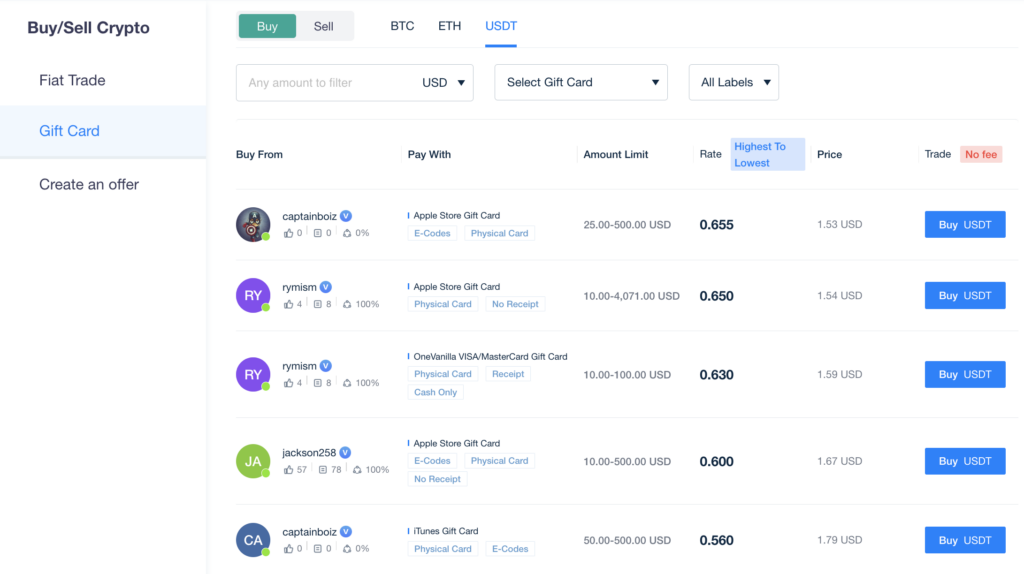
Go to coincola.com and log in. From the main navigation, select Gift Cards or go to P2P Trading → Gift Cards. You will see a marketplace showing active buyers and their current offer rates for each card type.
Before creating your own listing, browse the existing buyer offers first. You may find a buyer already offering the rate you want — initiating a trade with an existing buyer is faster than waiting for buyers to find your listing.
Step 2: Choose Your Gift Card Type and Check Current Rates
In the Gift Cards section, select your card type (e.g., Amazon, Google Play, iTunes). You will see a list of buyers showing their:
- Offer rate — percentage of face value they are paying in USDT
- Min / Max trade limits — the card value range they accept
- Completion rate — percentage of trades they have completed (aim for 90%+ buyers)
- Number of trades — trading history volume
Step 3: Initiate the Trade or Post Your Listing
Option A — Respond to an existing buyer offer (recommended for beginners):
- Click on a buyer offering a rate you find acceptable
- Enter the card denomination (e.g., $50 or $100)
- Click “Sell” to initiate the trade
- CoinCola enters an escrow window — the buyer is notified and the trade timer starts
Option B — Post your own listing:
- Click “Post Ad” or “Create Offer”
- Select card type, set your minimum rate (e.g., “I want at least 72%”), and set min/max denomination
- Submit the listing — it is free
- Wait for buyers to respond (may take minutes to hours depending on card type)
Step 4: Send the Gift Card Information
Once a trade is open:
- The buyer will confirm and send specific instructions for card verification
- Send your gift card details through the CoinCola chat window. For most cards this means:
- Physical card: clear photos of front and back, including the scratch-off PIN
- Digital code: paste the redemption code directly into the chat
- eGift card: screenshot or PDF of the email showing the code
- Never share your card details outside of CoinCola’s trade chat
Critical safety rule: Only share gift card codes AFTER the trade is open in the CoinCola escrow system. Never send codes via WhatsApp, Telegram, or any other channel before the trade starts. If a “buyer” asks you to send the code first and pay later — that is a scam.
Step 5: Wait for Card Verification
The buyer will verify the card balance. For most cards this takes 5–20 minutes. During this time:
- The trade is in escrow — neither party can cancel without platform review
- If the card has the correct balance and is unused, the buyer marks the trade complete
- If there is an issue (card already used, wrong region), the buyer opens a dispute
Step 6: Receive USDT in Your Wallet
Once the buyer confirms the card is valid and completes the trade:
- USDT is released from escrow to your CoinCola wallet automatically
- You will see the credit within seconds of trade completion
- CoinCola deducts the 0.7% platform fee at this point
- You can hold the USDT in your CoinCola wallet, withdraw to an external wallet, or sell it for Naira/KES/GHS via the P2P board
Total time from listing to USDT in wallet: Using an existing buyer offer, most gift card trades complete in 15–45 minutes. Complex cards (like Visa gift cards that require activation confirmation) may take up to 2 hours. The platform has a trade timer — if a buyer goes inactive, you can cancel or escalate to CoinCola support.
Related: Top 5 Highest Rate Gift Cards on Paxful Alternative 2023
How to Get a Better Rate: Practical Tips
1. Compare offers before accepting
Rates on CoinCola P2P are set by individual buyers — they vary daily based on demand. Spend 2 minutes comparing the top 5–10 buyer offers before selecting one. A 3% rate difference on a $200 card is $6.
2. Time your listing for peak hours
Gift card buyers are most active in the evenings (West Africa time, UTC+1). Listing or browsing offers between 7pm–11pm WAT usually results in faster trades and slightly better rates due to higher competition among buyers.
3. List the correct region
Always specify the card region accurately (US, UK, CA, AU, EU). Buyers pay different rates for different regions — listing a UK card as US will get your trade cancelled or disputed, which damages your completion rate.
4. Use high-quality card images
For physical cards, send clear photos where the PIN is fully legible. Blurry or incomplete photos slow down verification and frustrate buyers. A clear photo = faster trade = faster USDT.
5. Build your reputation score
CoinCola displays your completion rate and number of trades to buyers. New accounts with 0 trades may get lower offers initially. Complete 5–10 trades at whatever rate is available to build your profile — then negotiate from a position of credibility.
Related: How to Find a Legit Gift Card Vendor in 2023
Avoiding Scams: Red Flags to Know
| Red flag | Risk level | What to do |
|---|---|---|
| Buyer asks to move to WhatsApp/Telegram before trade opens | High | Decline immediately — this is the classic off-platform scam |
| Buyer says “send code first, I will pay right after” | High | Never. Escrow only — report this buyer to CoinCola support |
| Unusually high rate offer (90%+ for Amazon) | High | If the rate seems too good — it is a scam. Normal rates are 65–85% |
| Buyer has 0 completed trades or very low completion rate | Medium | Proceed with caution — prefer buyers with 50+ trades and 90%+ rate |
| Trade timer runs out with no buyer response | Medium | Cancel the trade — your card details are safe until you send them |
Ready to convert your gift cards into USDT? Take action today by visiting CoinCola and start your gift card conversion journey. Explore the potential of your unused gift cards and unlock the world of cryptocurrencies effortlessly.
You May Like: How To Sell Amazon Gift Card for PayPal on CoinCola
FAQs
Most trades complete within 15–45 minutes once you find a buyer. High-demand cards like Amazon and Google Play have buyers available 24/7. Niche cards (Sephora, restaurant cards) may take several hours to find a buyer.
Minimum trade sizes depend on the individual buyer’s listing. Most buyers on CoinCola accept a minimum of $10–25 per trade. For small card balances (under $10), you may struggle to find a buyer and are better off using the card directly or combining multiple small cards.
Always choose TRC20 (Tron network) when possible. It has the lowest withdrawal fee (~1 USDT flat) and the highest liquidity on Nigerian P2P markets. Avoid ERC20 unless specifically required — gas fees can be $5–30 per transaction. Check that your destination wallet supports TRC20 before initiating withdrawal.
Yes — you can receive Naira (NGN) directly instead of USDT if the buyer pays in fiat. However, USDT offers are generally more competitive because the buyer pool is larger. Many sellers receive USDT and then immediately sell the USDT for Naira via the P2P board to get the best overall value.
If the buyer finds the card invalid (already redeemed, wrong region, or incorrect denomination), they will initiate a dispute through CoinCola. Do not panic — you have 24 hours to respond with proof (card packaging, purchase receipt). CoinCola will review the dispute and make a decision. This is why escrow protection matters: your card details are only shared within a protected trade environment.
CoinCola is a peer-to-peer marketplace — you are selling to other users, not to CoinCola directly. This means rates are determined by market supply and demand, not by a fixed platform rate. This typically results in better rates than platforms that buy cards directly, because buyers compete with each other for your card.
Start Converting Your Gift Cards
Gift cards sitting unused are wasted value. On CoinCola P2P, converting them to USDT takes under an hour and costs less than 1% in platform fees. The key steps:
- Log in to coincola.com and complete basic KYC
- Browse gift card buyers for your card type — compare rates before selecting
- Open a trade with a buyer who has 90%+ completion rate and 50+ trades
- Send card details through the CoinCola chat only — never off-platform
- Receive USDT in your wallet after buyer verification
- Optional: sell your USDT for Naira on the P2P board for immediate local currency
Related Guides
- Want to sell your USDT for Naira after converting? See: How to Convert USDT to Naira on CoinCola (2026)
- Understanding P2P wallet options: Best USDT Wallets for Nigerian Naira Withdrawal
- Looking for P2P alternatives after Binance? Best P2P Crypto Exchange in Nigeria After Binance (2026)
- Complete remittance guide: How to Send Money to Nigeria with Crypto in 2026