How to Withdraw from Trust Wallet (2026): To Exchange, M-Pesa & More
Trust Wallet is a non-custodial wallet — withdrawing means sending crypto to another address (exchange, P2P platform, or another wallet). This guide covers 4 withdrawal routes: to a CEX, to CoinCola P2P, to M-Pesa via P2P, and to a bank account. Also includes a section on safely claiming airdrops.
How Trust Wallet Withdrawals Work
Hey fam — before we get into steps, one thing to understand: Trust Wallet doesn’t have a “withdraw to bank” button. It’s a non-custodial wallet, which means you’re holding your own crypto directly. There’s no account balance you can wire to a bank the way you can with PayPal.
“Withdrawing” from Trust Wallet always means one of two things:
- Sending crypto to another address — an exchange wallet, a P2P platform, or someone else’s wallet
- Selling your crypto via a P2P platform and receiving local currency to your mobile money or bank account
So, you’re ready to dive into the crypto world with Trust Wallet? Fantastic! Let’s walk through the steps together.
First things first, ensure you download Trust Wallet from the official sources. Find the links for App Store here and Google Play here.
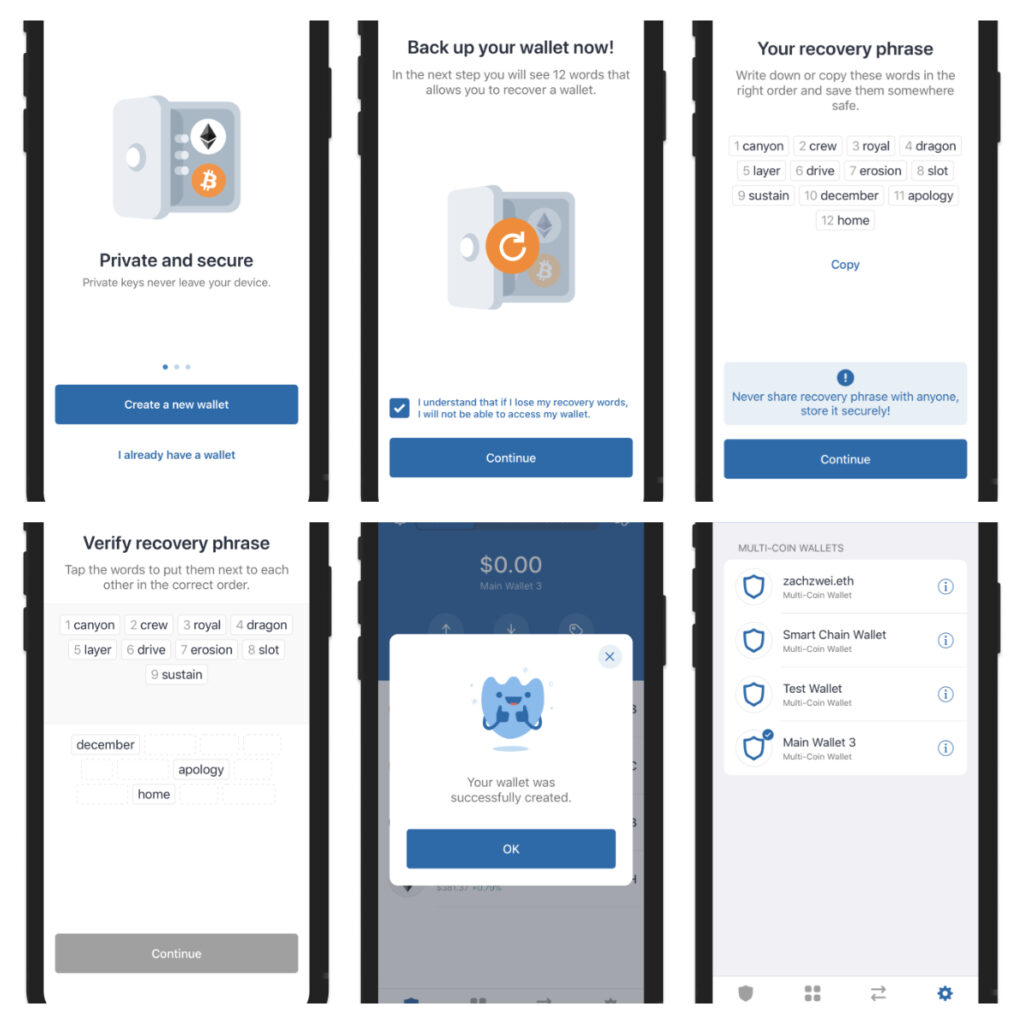
Both are straightforward once you know the steps. Here’s how each works.
Before You Withdraw: Key Checks
Before sending anything, run through this checklist:
- Correct network — USDT exists on multiple blockchains (TRC20, ERC20, BEP20). Always confirm the recipient address uses the same network as what you’re sending. Sending TRC20 to an ERC20 address = funds lost.
- Enough native token for gas — Every blockchain requires a small amount of its native token to pay transaction fees. For TRON (TRC20): need TRX. For Ethereum (ERC20): need ETH. For BNB Smart Chain: need BNB.
- Test transaction first — For any new address, send a small test amount first. Confirm it arrived before sending the rest.
- Double-check the address — Copy-paste addresses, never type manually. Triple-check the first 4 and last 4 characters.
Method 1: Withdraw to a Centralized Exchange
This is the most common route — send your crypto from Trust Wallet to Binance, Coinbase, OKX, or another exchange to trade it.
Steps
- Open your exchange app and go to the deposit section for the coin you want to send (e.g., USDT)
- Select the correct network — for USDT, choose TRC20 if you’re sending from Trust Wallet’s TRC20 USDT. Copy the deposit address.
- Open Trust Wallet → tap the asset you want to send (e.g., USDT TRC20)
- Tap Send
- Paste the exchange deposit address into the recipient field
- Enter the amount — leave a small buffer for network fees
- Review the transaction details — network, address, amount
- Tap Confirm
Arrival time: TRC20 usually arrives within 1–3 minutes. ERC20 can take 5–30 minutes depending on network congestion.
Common mistake: Selecting the wrong network. If your exchange deposit address is for TRC20 but you send ERC20, the funds will not arrive and recovery is difficult. Always match networks.
You may like: How to Receive CoinMarketCap Airdrop
Method 2: Withdraw USDT to M-Pesa via CoinCola P2P
This is the fastest way to convert USDT in Trust Wallet into local currency (KES, NGN, GHS, etc.) and get it into your M-Pesa or mobile money account.
Overview of the flow
Trust Wallet → CoinCola → P2P buyer pays you via M-Pesa
Full steps
Step 1: Send USDT from Trust Wallet to CoinCola
- Open CoinCola → go to Assets → Deposit → USDT
- Select TRC20 network and copy your CoinCola USDT deposit address
- In Trust Wallet, tap USDT TRC20 → Send → paste the CoinCola address
- Confirm the transaction — USDT arrives in CoinCola within 1–3 minutes
Step 2: Create a sell order on CoinCola
- Go to Sell → USDT
- Filter by your local currency (KES, NGN, GHS, etc.) and payment method (M-Pesa, bank transfer, etc.)
- Choose a buyer with good trade history and sufficient balance
- Enter the amount and confirm
Step 3: Receive local currency
Once you confirm the trade, the buyer sends your local currency directly to your M-Pesa or bank account. Release the USDT once you’ve confirmed receipt.
Typical time: 10–20 minutes end-to-end
Fees: CoinCola charges zero platform fees — you pay only the Trust Wallet → CoinCola transfer fee (under $1 for TRC20)
You may like: How to Check Your Cryptocurrency Transaction Status
Method 3: Withdraw to Another Wallet Address
Sending to a friend’s wallet, a hardware wallet (Ledger/Trezor), or another self-custody app follows the same steps as Method 1 — just use the recipient’s wallet address instead of an exchange deposit address.
Key reminders:
- Confirm the recipient is using the same network (ask them explicitly)
- Send a test transaction first for amounts over $50
- For Bitcoin: Trust Wallet uses native SegWit addresses (starting with
bc1) — most modern wallets support these, but double-check with older wallets
Method 4: Cash Out to Bank Account
Trust Wallet doesn’t connect directly to bank accounts. To cash out to a bank, you have two routes:
Route A: Via a centralized exchange Send to CoinCola (Method 1) → sell crypto on the exchange → withdraw fiat to your bank account via the exchange’s bank withdrawal feature. This is the most common route but involves the exchange’s withdrawal fees and processing time (1–3 business days typically).
Route B: Via CoinCola P2P Follow Method 2, but when selecting payment method on CoinCola, filter for bank transfer instead of mobile money. Many P2P buyers pay directly to bank accounts.
You may like:
How to Sell USDT with M-Pesa in Kenya (2024 Version)
4 steps for Nigerians to sell bitcoin
Where Can I Sell My BTC in Ghana?
Common Withdrawal Errors & Fixes
“Insufficient funds for gas”
You don’t have enough TRX/ETH/BNB to pay the network fee. Buy a small amount of the native token (e.g., 10 TRX for TRC20 transfers — costs under $1) and retry.
Transaction stuck / pending
For Ethereum-based transfers, network congestion can cause delays. Check the transaction hash on Etherscan — if it’s been pending for over an hour, you may need to speed it up by resubmitting with a higher gas fee. For TRC20, transactions almost never get stuck.
“Invalid address”
You may have copied an address from the wrong network. Double-check you’re sending to the correct chain address. ERC20 and BEP20 addresses look identical (both start with 0x) but are different networks — always confirm with the recipient.
Funds sent to wrong address
Unfortunately, blockchain transactions are irreversible. If you sent to the wrong address, check whether it was a deposit address at an exchange — if so, contact their support immediately with the transaction hash. If it was a random address, the funds are very likely unrecoverable.
You may like: What is Airdrop? Unlocking Free Crypto!
How to Claim Airdrops in Trust Wallet (and Stay Safe)
Legitimate airdrops do exist — new projects sometimes distribute free tokens to existing wallet holders as a marketing strategy. Here’s how to handle them safely in Trust Wallet.
How real airdrops work
- A project announces an airdrop publicly (via their official website, Twitter/X, or Discord)
- You either qualify automatically (based on your wallet history) or complete tasks (follow, retweet, etc.)
- After the snapshot/distribution date, tokens appear in your wallet — or you claim via the project’s official dapp
Adding an airdrop token in Trust Wallet
If a token you received doesn’t show up automatically:
- Open Trust Wallet → tap “+” (top right) to manage tokens
- Search for the token name — if not found, tap “Add Custom Token”
- Enter the official contract address (get this from the project’s official website only)
- The token will now appear in your wallet
⚠️ Airdrop scam warning
The vast majority of “free airdrop” offers are scams. Red flags:
- Any airdrop that asks you to connect your wallet and approve a transaction — this is almost always a wallet drainer
- Airdrops promising huge sums ($500+) for simple tasks
- Links sent via DM on Telegram, WhatsApp, or Twitter from strangers
- Sites that ask for your seed phrase — never, under any circumstances
Real airdrops never need your seed phrase or your private key. If someone asks for it, it’s a scam — full stop.
Conclusion
In conclusion, Trust Wallet stands as a secure haven for crypto enthusiasts, offering a seamless experience for both withdrawals and airdrop participation. By following the outlined steps and adhering to safety measures, users can navigate the crypto landscape with confidence.
Unlock even more possibilities by exploring CoinCola for your crypto transactions. Buy and sell with ease, leveraging the robust features of a trusted platform.
FAQs
TRC20 (TRON): 1–3 minutes. ERC20 (Ethereum): 5–30 minutes depending on gas fees. BEP20 (BNB Chain): 1–5 minutes. Bitcoin: 10–60 minutes.
Not directly — Trust Wallet sends crypto, not local currency. Use CoinCola P2P: send USDT from Trust Wallet to CoinCola, then sell to a buyer who pays via M-Pesa. Takes about 10–20 minutes.
You need the native blockchain token to pay gas fees — TRX for TRC20, ETH for ERC20, BNB for BEP20. Your USDT balance doesn’t cover gas fees. Buy a small amount of the native token and retry.
Only through official project channels. Never connect your wallet to unverified sites, never approve unknown transactions, and never share your seed phrase. Most unsolicited “free airdrop” messages are scams.
Trust Wallet has no minimum — but the network fee effectively creates a practical floor. For TRC20 USDT, sending less than $2–3 means the fee takes a significant percentage of your transfer.
No. Trust Wallet requires an internet connection to broadcast transactions to the blockchain network.